
Universal POS Integration Web Service
Scope
This document details our API to integrate our Partners' POS systems with HungerStation's Platform via our Cube middleware.
Assumptions
Partner is able to build and host a RESTful API adapter/connector to both provide and consume endpoints.
Terminology
References: HungerStation and Partner both have internal references to their object, e.g. Order ID. To distinguish, any HungerStation reference will use the ID suffix and any Partner reference will use the Reference suffix. For example, orderId will refer to the HungerStation internal order, while orderReference refers to the Partner's internal order reference. Similarly, branchId vs branchReference, restaurantId vs restaurantReference, etc refer to the HungerStation vs Partner internal references.
Routing
The Universal POS API has the routing name "pos". The staging server is cube.hs-staging.com.
Partners will connect to https://cube.hungerstation.com/pos as the base path. Endpoints are found at https://cube.hungerstation.com/pos/branch_status as an example.
Workflow
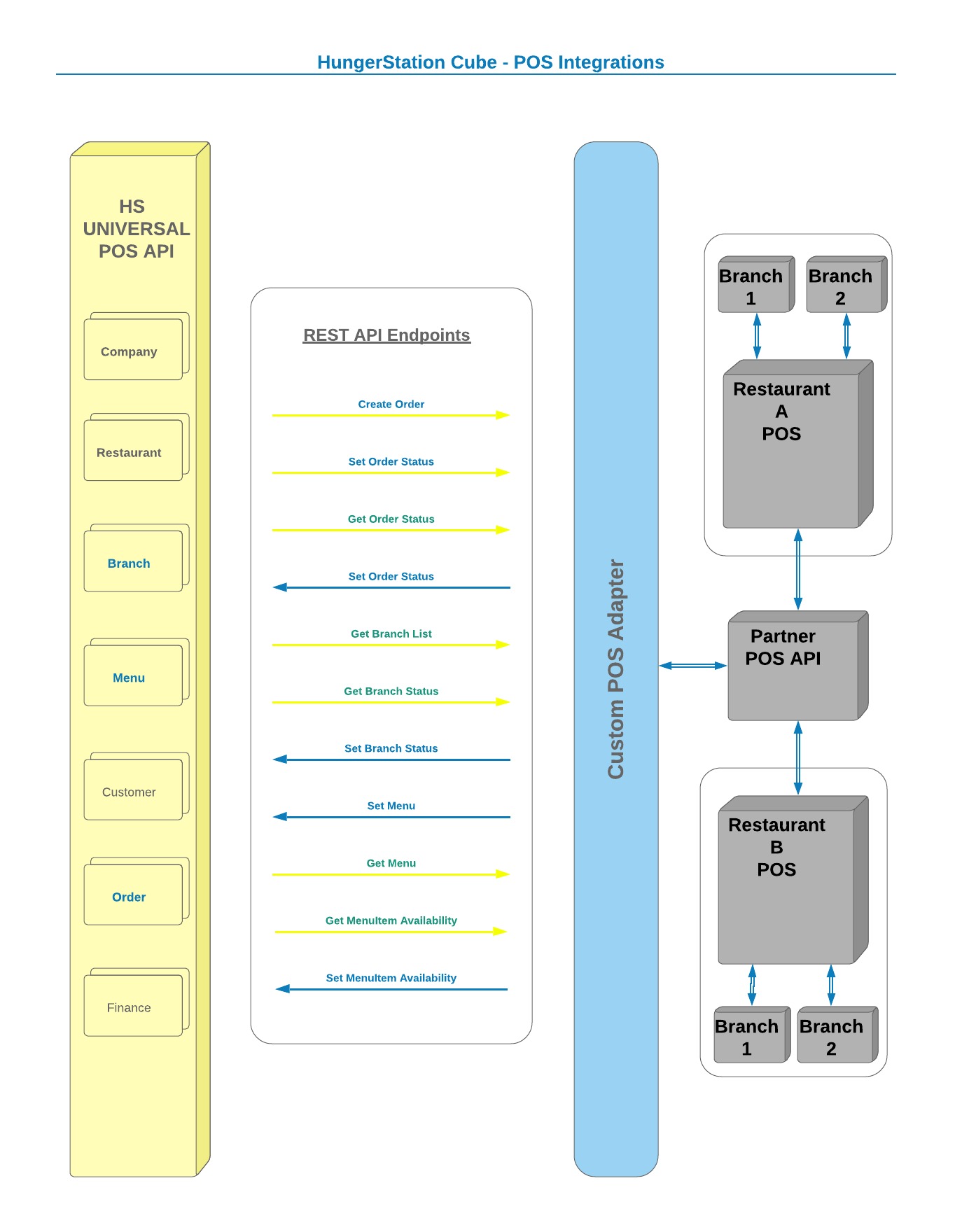
Content-Types
Payload and Response formats are always application/json.
Error responses are always of type application/problem+json.
HTTP Methods and Status Codes
Each endpoint always uses an appropriate method (POST for Creating, GET for Reading, etc) and returns a reliable response code (200 for OK, 201 for Created, 401 for Unauthorized etc). For example, the /pos/branch_status endpoint only listens to method PUT, all other methods will return a 404 status code. Please note that GET requests are allowed to have a payload.
Authorization
HungerStation will provide each Partner with a unique clientId and unique token. Every endpoint uses the clientId and token for identification and authorization. The request headers will pass the token in a key called Authorization.
Partner access can be limited to a set of approved IP Addresses (recommended).
Identification
The client_id will be in the body, along with a key for restaurantReference (which will be the Partner's identification parameter of the restaurant the call is made for).
Menu Explanation
Weight
Please consider "weight" to be the "sort order". Starting at 0, it will be the order of the items or products or modifiers.
Products
Everything is a menuItem. Products are used to group menuItems along the lines of Sizes normally. For example, if you have Small Margherita, Medium Margherita and Large Margherita pizzas you would create these 3 as menuItems. Create a single Product called Margherita Pizza and link the menuItems to the Product. On our channels, we would display the Product and within the Modifier screen we should show the choice of the 3 sizes...
Timings
Platform
POST /order as soon as an order is placed by a customer (after we assign a driver).
GET /menu by agreed schedule, typically once a week or every day (early morning)... depending on the restaurants.
GET /order_status every few minutes for active orders (typically until Order Status is Picked Up for Delivery).
GET /branch_status every minute (single call per restaurant with all branchReferences).
-
GET /status every minute per restaurant. If you return a 0, or we do not get a response, we will close the restaurant as the POS connection is down. We expect a response of 1 to keep the restaurant open on our channels.
-
PUT /order_status will be called in case the order is cancelled (at the moment this is the only reason we would call it, but this method might be used in future for other purposes/statuses).
Adapter
-
PUT /menu will be blocked except out of branch working times, and limited to once per day (slightly negotiable on this, but definitely out of working/peak hours).
-
PUT /menu_availability can be called at any time. We try to do everything we can to avoid failed orders, so we do not want our customers to choose an out-of-stock item. As soon as a branch runs out of an item, please call this endpoint so the item is hidden for that branch. This resets after 24 hours, unless the endpoint is called with the item and a status of 1 (for available).
-
PUT /branch_status should be called as soon as a branch is opened or closed. We can rely on the predefined working hours, but this endpoint can be more accurate. We prefer the branch POS is not closed during prayer times as orders might fail, but that is a business decision per restaurant we understand.
-
PUT /order_status is to be called for active orders at any stage of the workflow (e.g. Food Prepared, Order Cancelled).
Responses
All successful (2xx) responses will contain a "data" block with the information requested (where appropriate), e.g. an array of objects containing orderReferences and statuses. The Data block can be an array or an object, depending on the method called.
If an array is returned:
Data Array Response
      {
          "data" :
          [
              {
                  "customerId" : "1121" ,
                  "name" : "Yusuf" ,
                  "surname" : "Moola"
              },
              {
                  "customerId" : "2309" ,
                  "name" : "Aya" ,
                  "surname" : "Younis"
              }
          ]
      }
If no response is required, for example PUT /pos/branch_status, the HTTP Response of 200 (OK) will indicate success, with the response body being empty.
Error Responses
If an error occurs, each API method will return a JSON object based on the Problem Details spec at https://tools.ietf.org/html/rfc7807.
An example of an error response is:
      {
          "type" : "about:blank" ,
          "title" : "Request failed" ,
          "status" : "405" ,
          "detail" : "HTTP method exception" ,
          "errors" :
          [
              {
                  "code" : 17,
                  "reason" : "HTTP Method not allowed here"
              }
          ]
      }
The Content-Type will be application/problem+json and the HTTP method response will be in the 4xx to 5xx range, e.g.:
      HTTP/1.1 400 Bad Request
      Content-Type: application/problem+json
      Content-Language: en
The type, title and status keys are mandatory. The status key will match the method result (e.g. 4xx).
In the errors array, each error will contain an object containing an error code and a reason. This error code will help HungerStation troubleshoot the issue and should be returned to us to query any issue please. The reason will provide a description of the problem, including input parameters where appropriate and safe to do so.
4xx Status Codes
A request can fail for a number of reasons. The most common failures are listed below. An error status code will be returned in the 4xx range.
|
EVENT
|
STATUS CODE
|
DESCRIPTION
|
|---|---|---|
| Token Error | 401 (Unauthorised) |
Token missing, malformed or invalid; API namespace invalid; access disabled |
| Bad Method | 405 (Method not allowed) | Method not available on this endpoint, e.g. DELETE /pos/order |
| Partner not found | 400 (Bad request) | Could not identify partner using client_id and token |
| IP exception | 403 (Forbidden) | IP Address not approved to access this Partner account |
| Format error | 406 (Not acceptable) | Format not application/json |
Status Codes
Branch Status Codes
| CODE | DESCRIPTION |
|---|---|
| 0 | Busy |
| 1 | Ready |
MenuItem Status Codes
| CODE | DESCRIPTION |
|---|---|
| 0 | Unavailable |
| 1 | Available |
Order Status Codes
| CODE | DESCRIPTION |
|---|---|
| 10 | Dispatched to vendor |
| 20 | Received by branch successfully |
| 30 | Food Prepared |
| 40 | Driver assigned |
| 50 | Picked up for delivery |
| 60 | Delivered successfully |
| 70 | Customer canceled |
| 80 | External service rejected order |